Structure Your Clinical Notes
Structure Your Clinical Notes
Structure Your Clinical Notes
Don't let your notes stay as plain written records. With ready-made templates, a clinical editor, and connections, turn each note into a meaningful part of the client's process.

Click the icon at the top right to switch to dark mode.
Clinical and Personal: Two Separate Workspaces
In Mindora, a client's clinical records and the therapist's personal workspace are kept separate. You can both manage the client's process in an organized way and carry out your reflection, supervision, and professional development within secure boundaries.
Clinical Notes
From assessment to case formulation, session notes to treatment plans, use structured note types for every stage of the process. Start with ready-made templates or build your own note structures.
Personal Workspace
Keep your reflection notes, supervision prep, professional development, and research separate from client records. Organize with folders to build a personal workspace that supports your clinical thinking.
An Editor Designed for Therapists
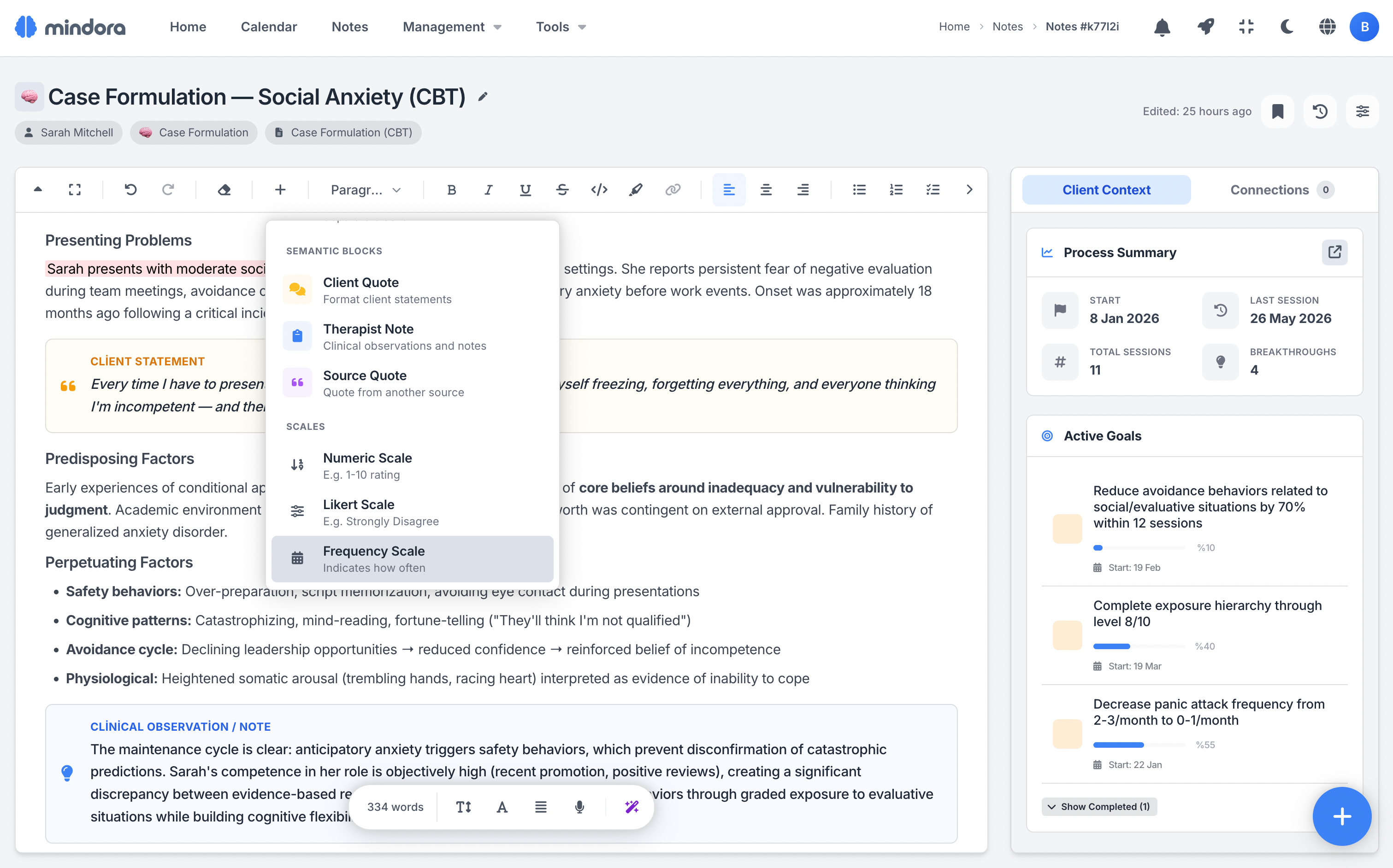
The client's voice, your clinical observations, and key insights stay clearly separated within the same note. So the note you write today still carries its meaning months later.
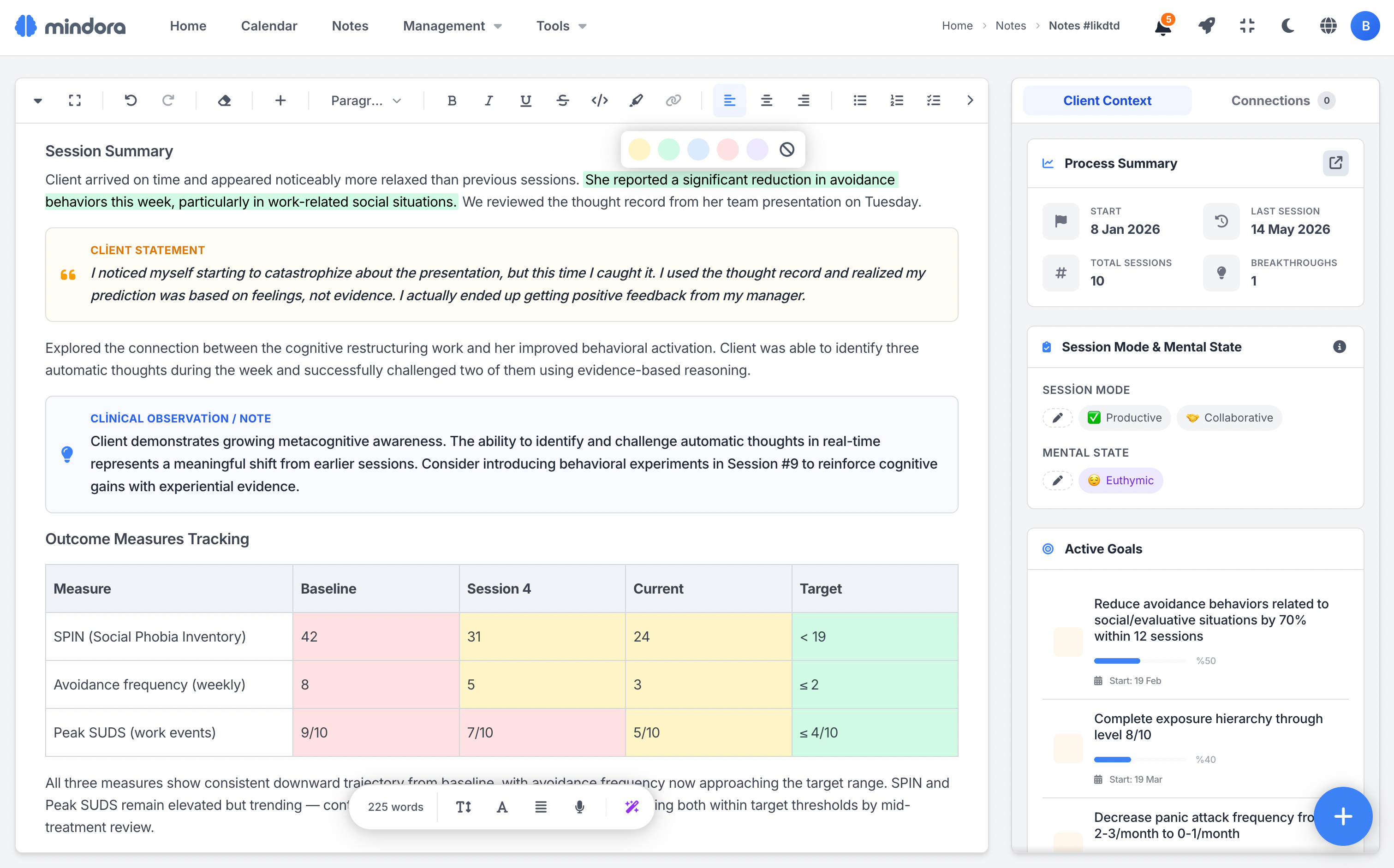
Mark critical points, progress, and risk factors with color highlights. Auto-save keeps your train of thought uninterrupted as you work.
Tune the View to Your Eyes
You decide the font, the size, and the content width. An editor experience that doesn't strain your eyes or break your flow during long writing sessions.
Pick the combination that sits right with you; your preference is saved and waits for you the same way in your next note.
Scales Right Inside Your Notes
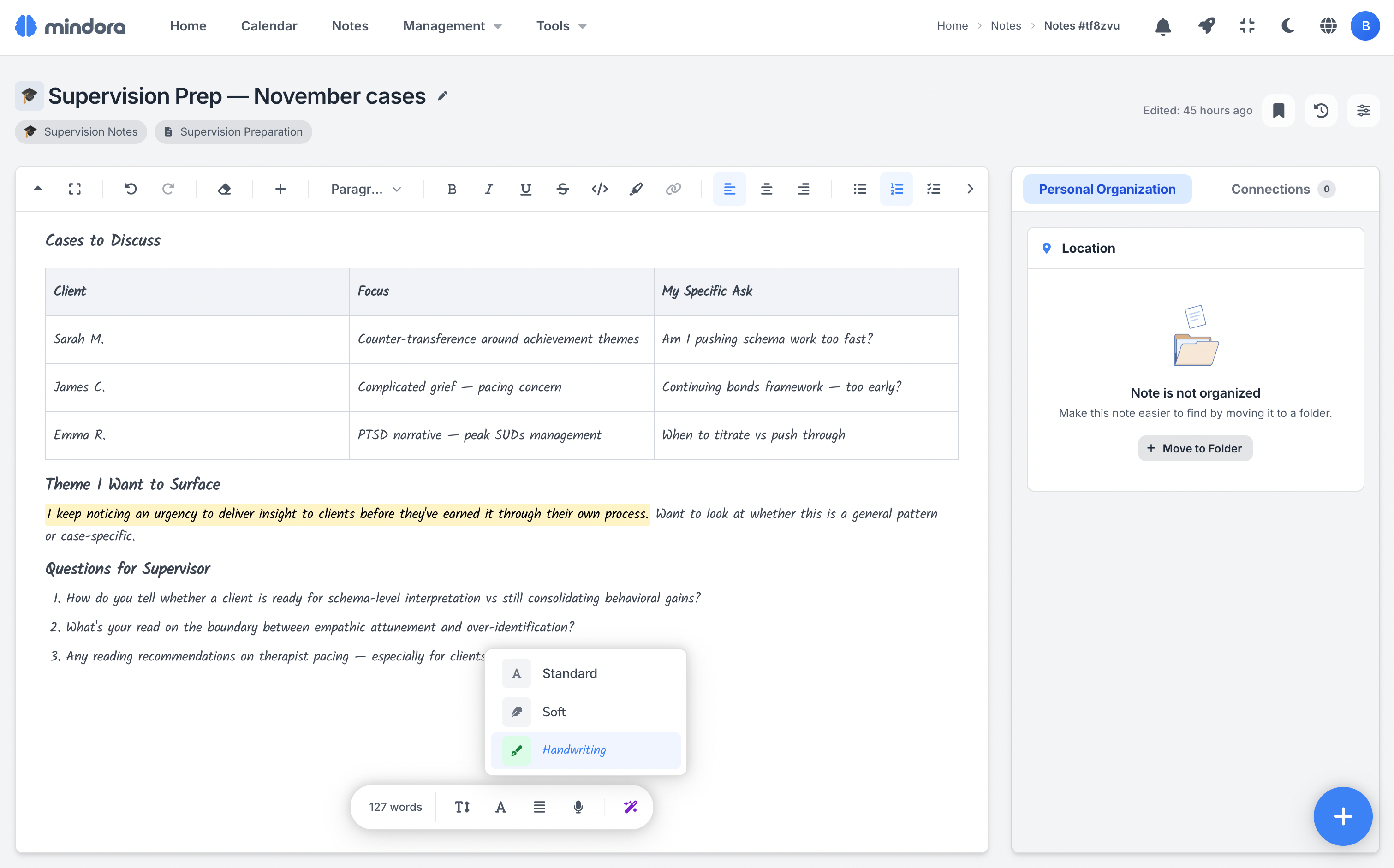
Embed numerical values like functioning level, treatment adherence, stress intensity, or SUD scores directly in your note using scales. See changes at a glance, session by session.
Create scales right inside your note; adjust the labels, range, and description to fit your needs.
Ready Structure for Every Session
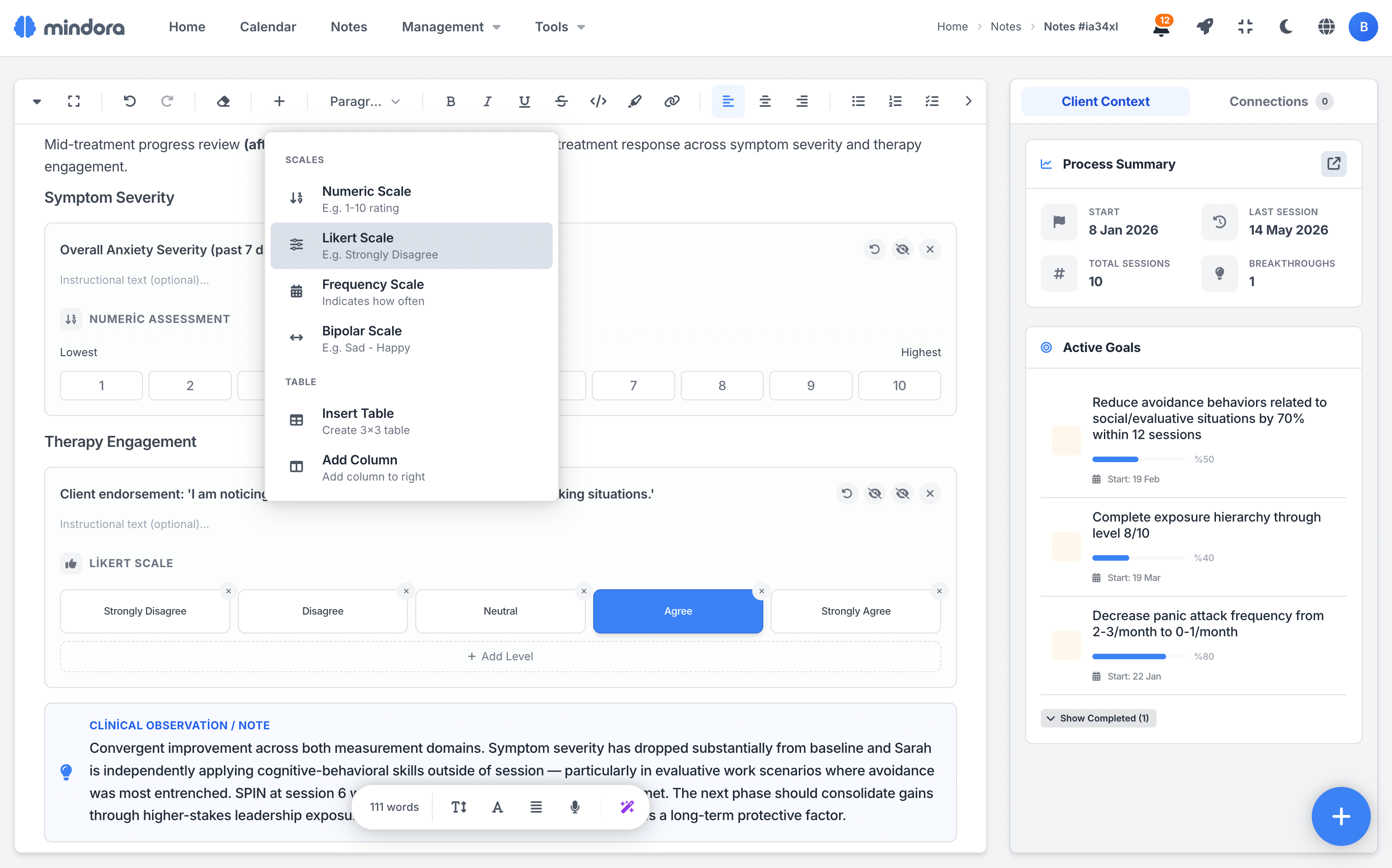
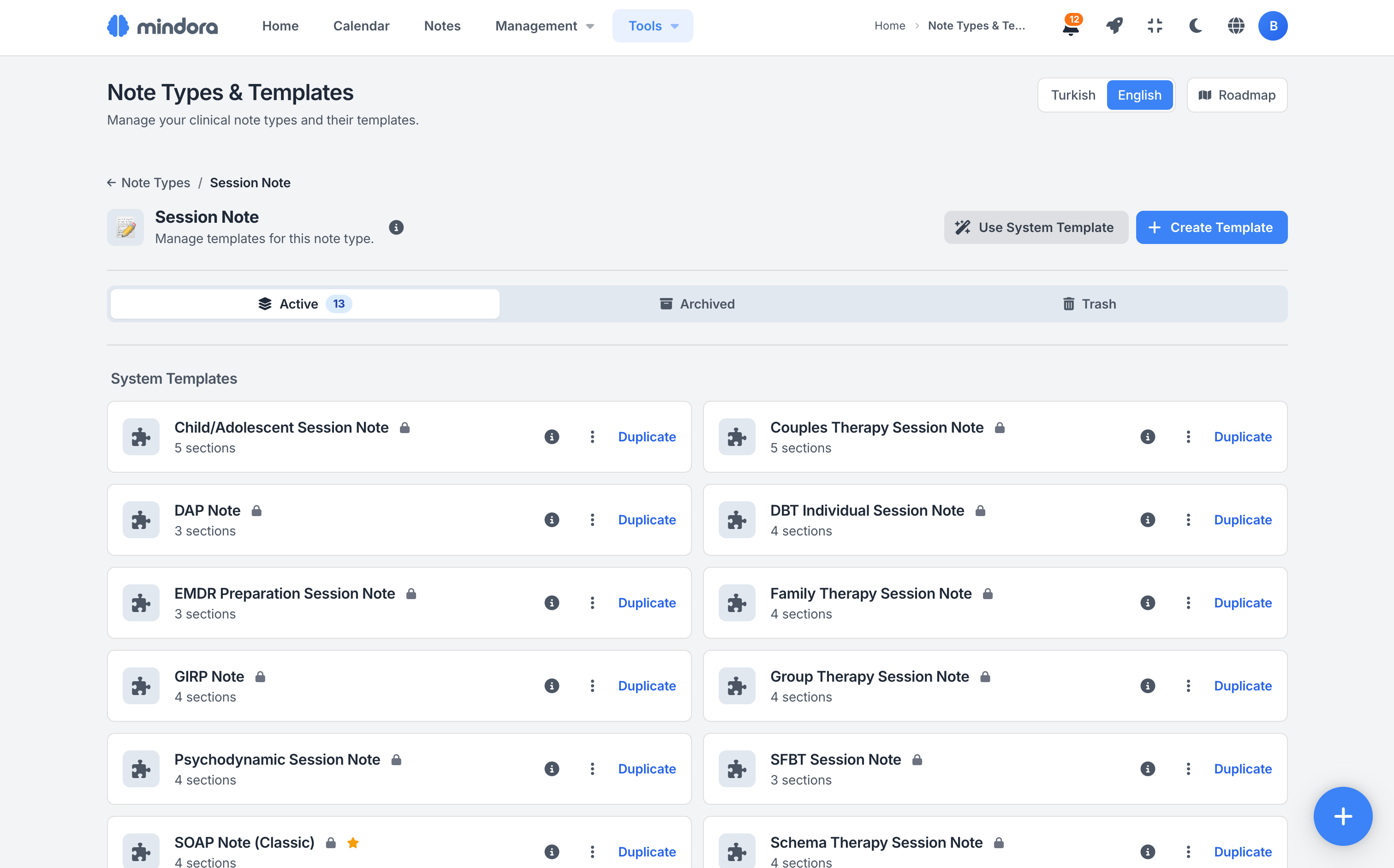
Start your notes on solid ground with templates built for different therapeutic approaches and session formats. Structures like SOAP, DAP, BIRP, EMDR, SUD/VOC, CBT, Schema Therapy, and DBT adapt to your clinical workflow.
Edit existing templates or build your own structure. Personalize your notes to fit how you work with text fields, checklists, tables, and scales.
Bridges Between Your Notes
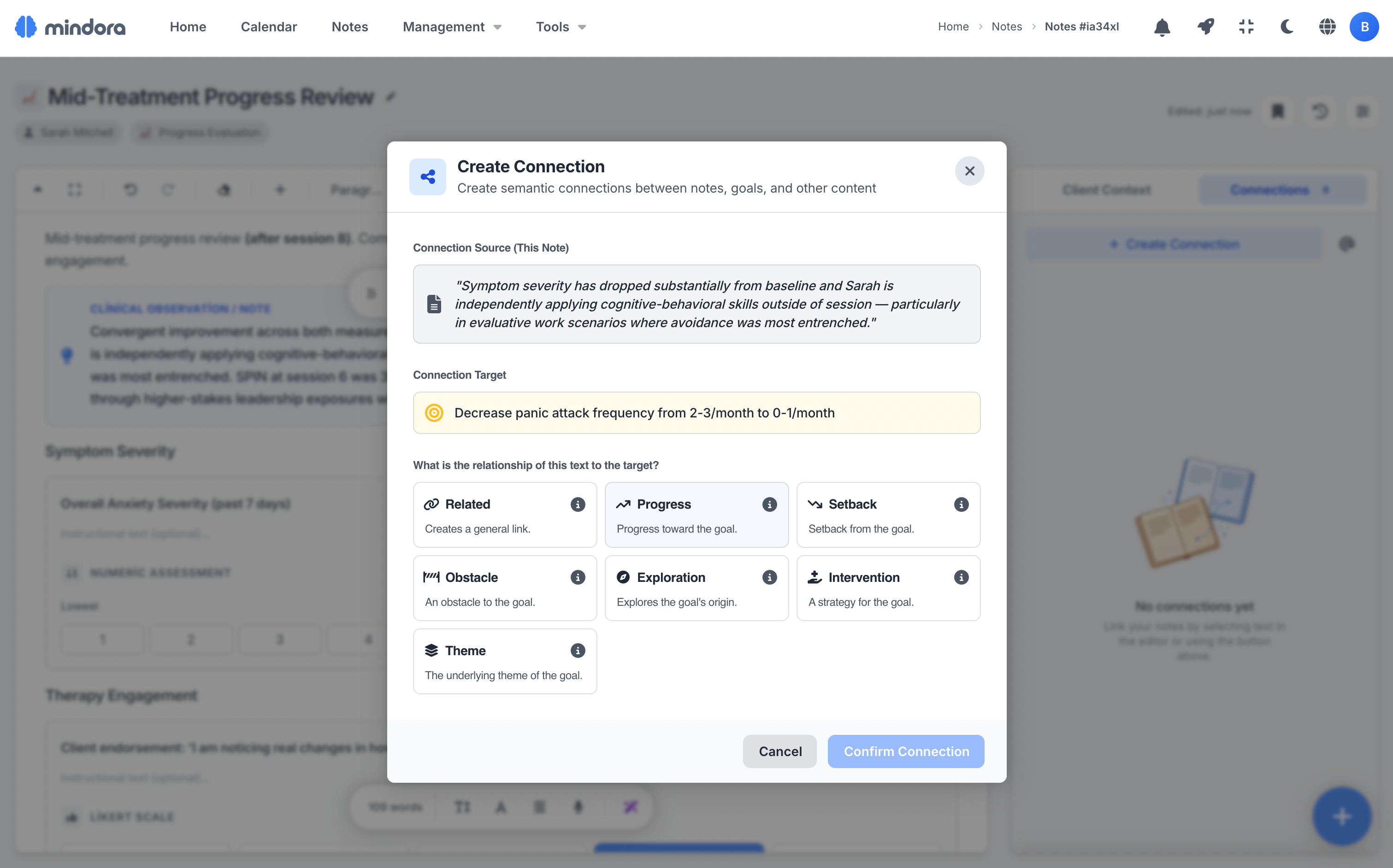
Link observations in your session notes to treatment goals and case formulations. Make the connections between different notes visible so you can track your client's clinical picture more clearly.
When you select a sentence as a connection source, the text is highlighted and its context is preserved. Connections can only be made between the same client's notes and goals, or within your own personal notes, keeping information within safe, correct boundaries.
Create Notes Quickly from Any Screen
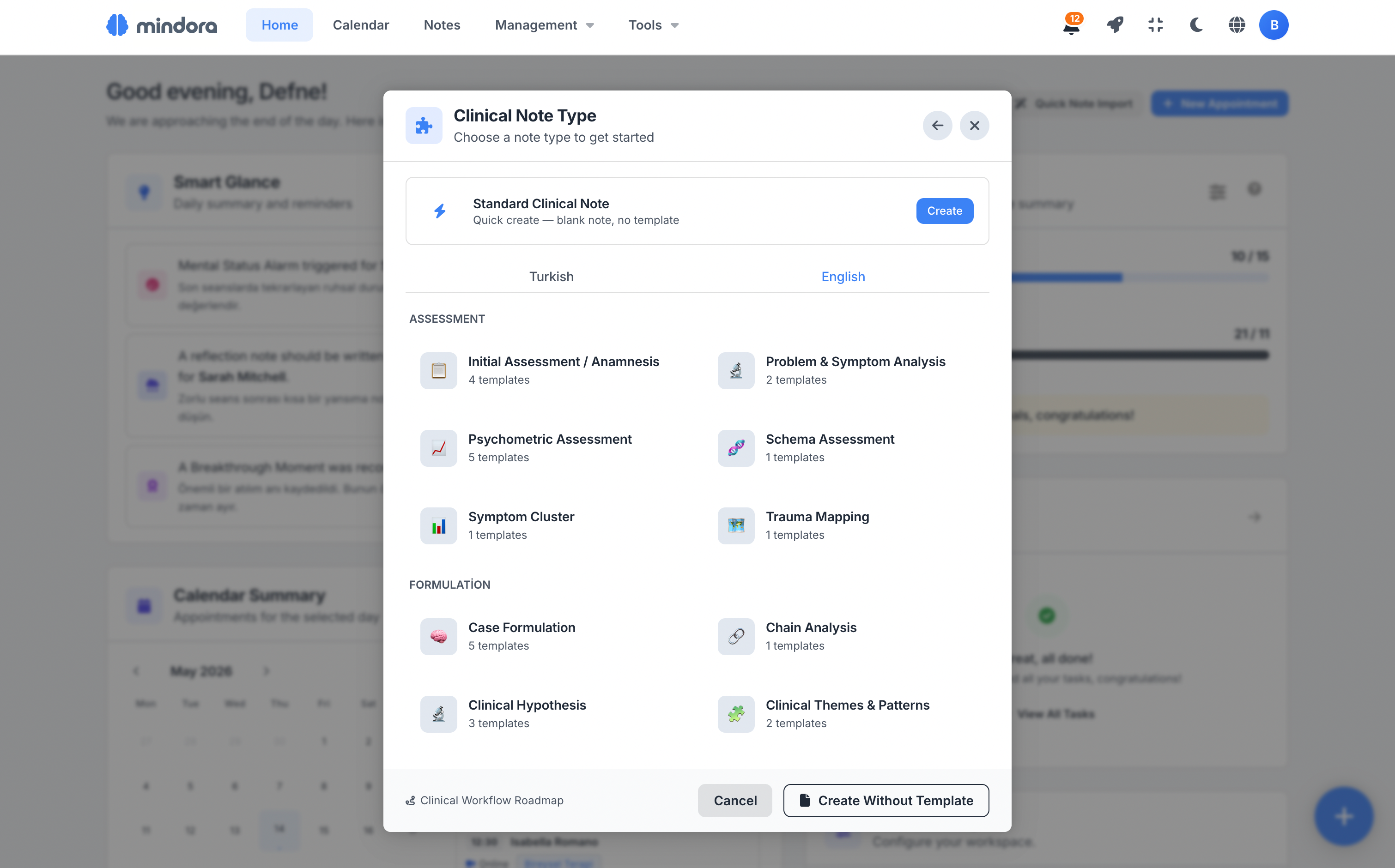
You don't have to break context to take a note. Start a new note from session details, the client profile, treatment goals, or the quick-note button accessible from every screen.
Mindora fills in the client and session info automatically. You just pick the note type, start from a template if needed, and keep going without losing your clinical thought.
You can import existing notes and export completed notes as PDF.
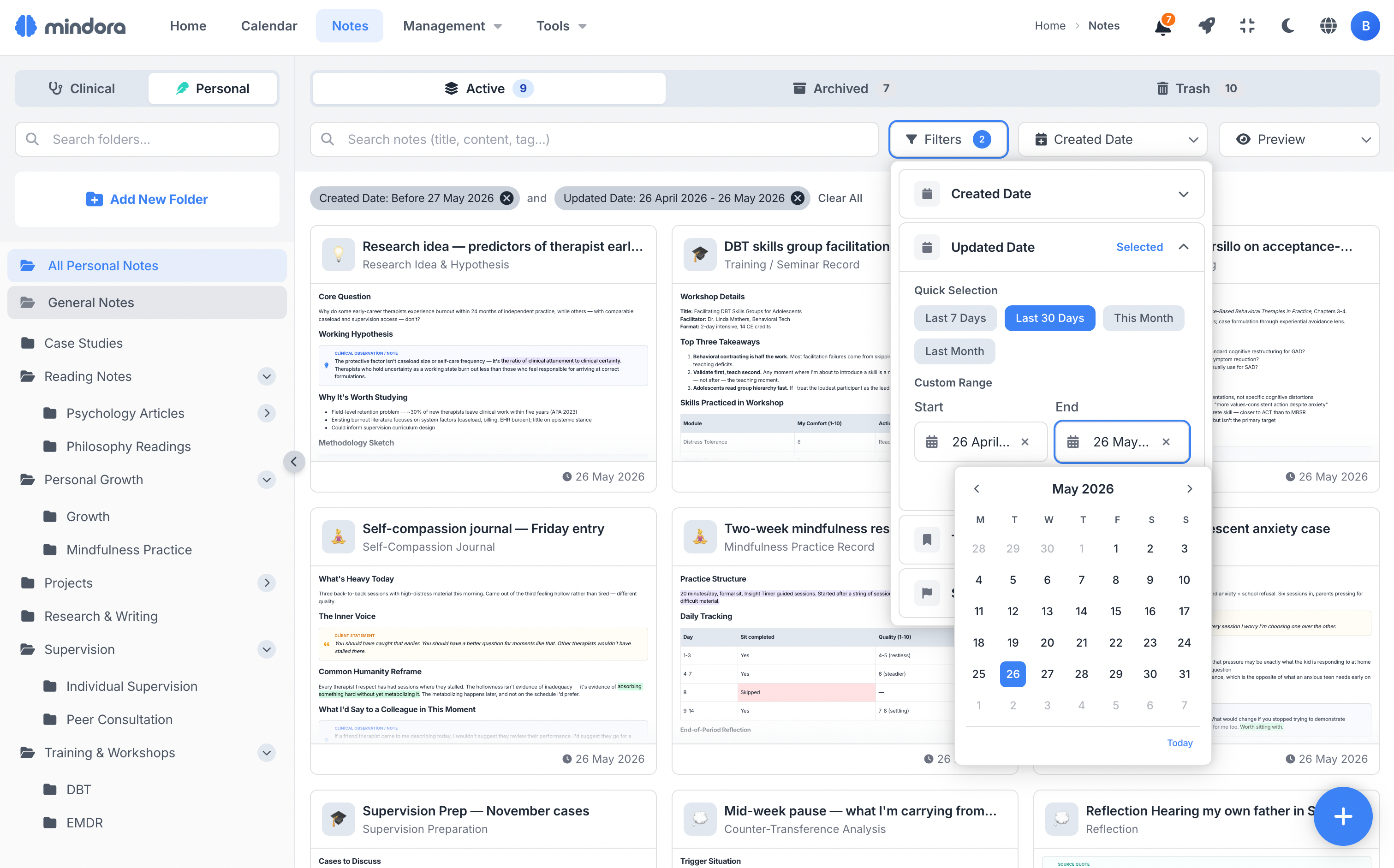
Find the Note You Need, Fast
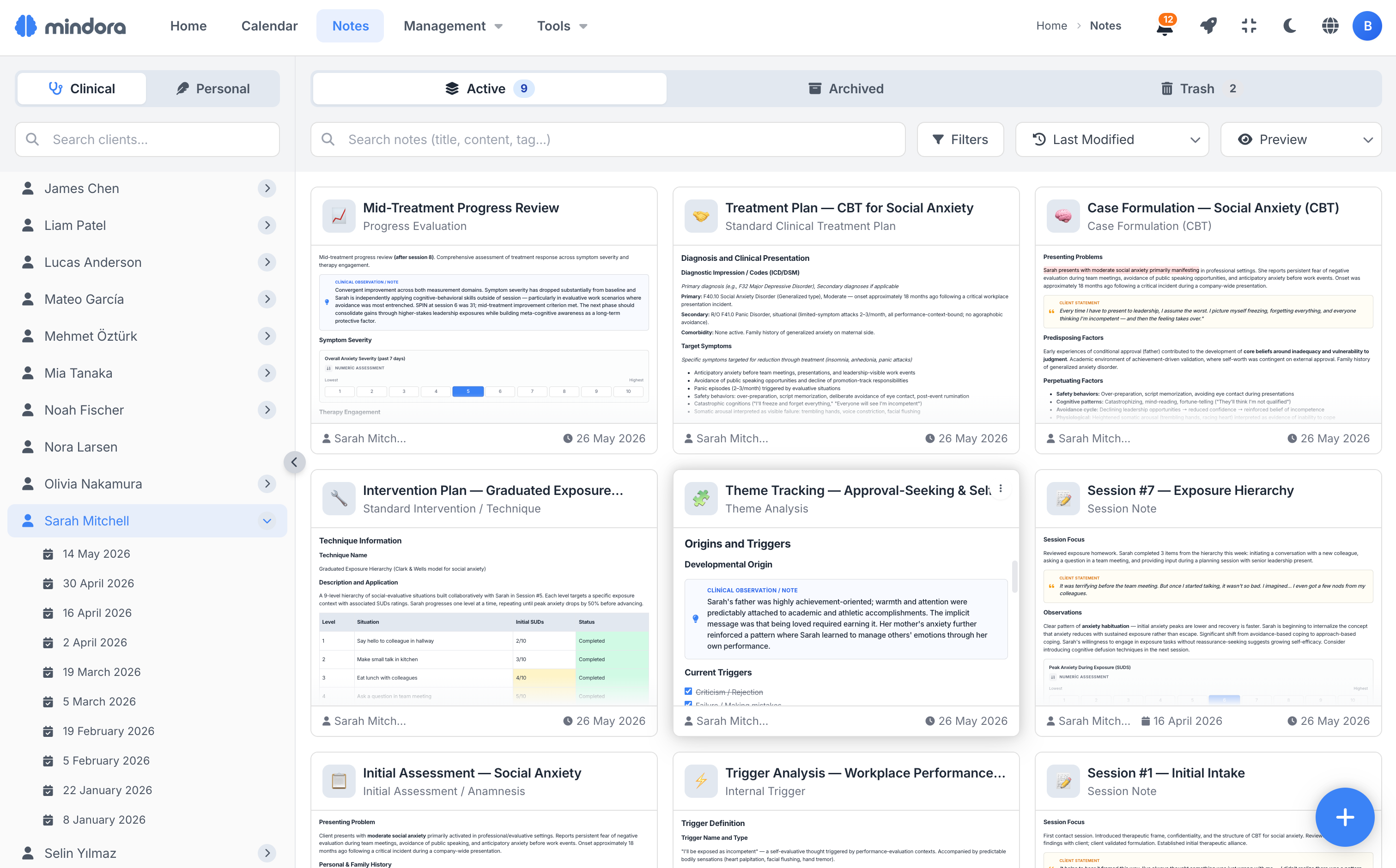
As your clinical history grows denser, reaching the right note becomes more valuable. Mindora helps you find what you need fast with search across client, date, note type, tag, title, and content.
Preview a note's content before opening it, and reach the record you're looking for without wasting time.
Reflection Notes
Capture the countertransference, emotional reactions, or professional insights you notice while reading a session note, within the note's own context. Select the relevant sentence, create your reflection, and keep visible where your clinical thinking comes from.
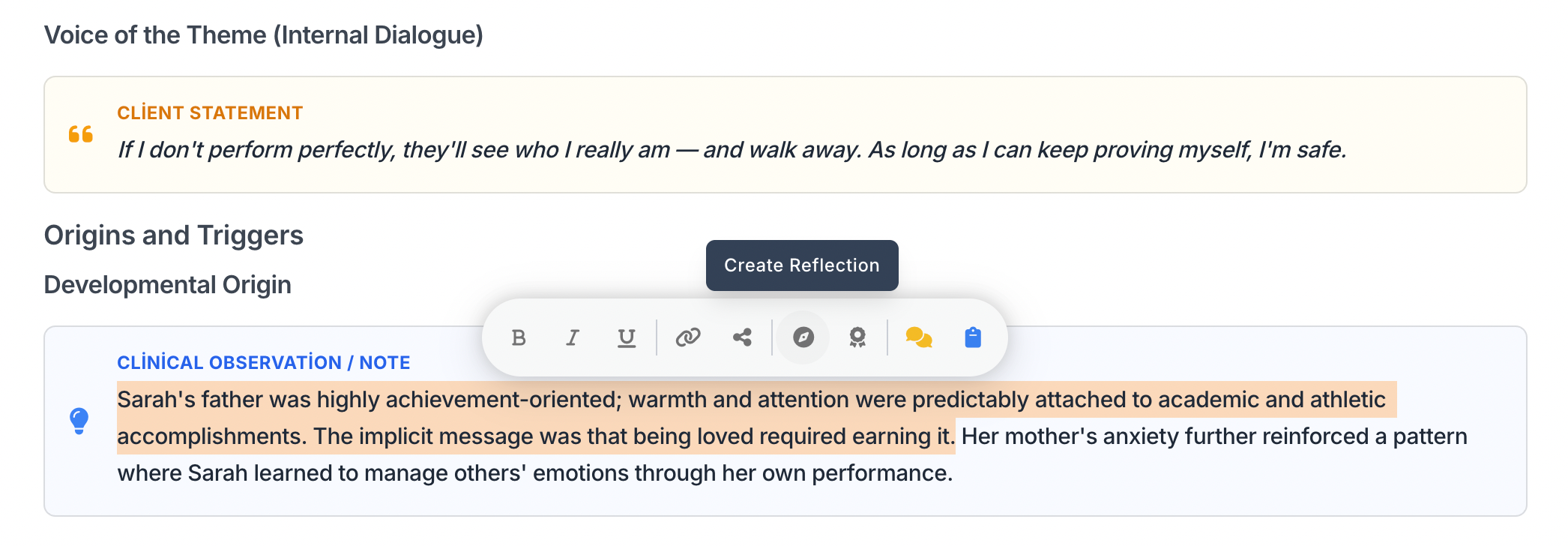
Select the Text
Select the relevant sentence in your session note and click "Create Reflection."
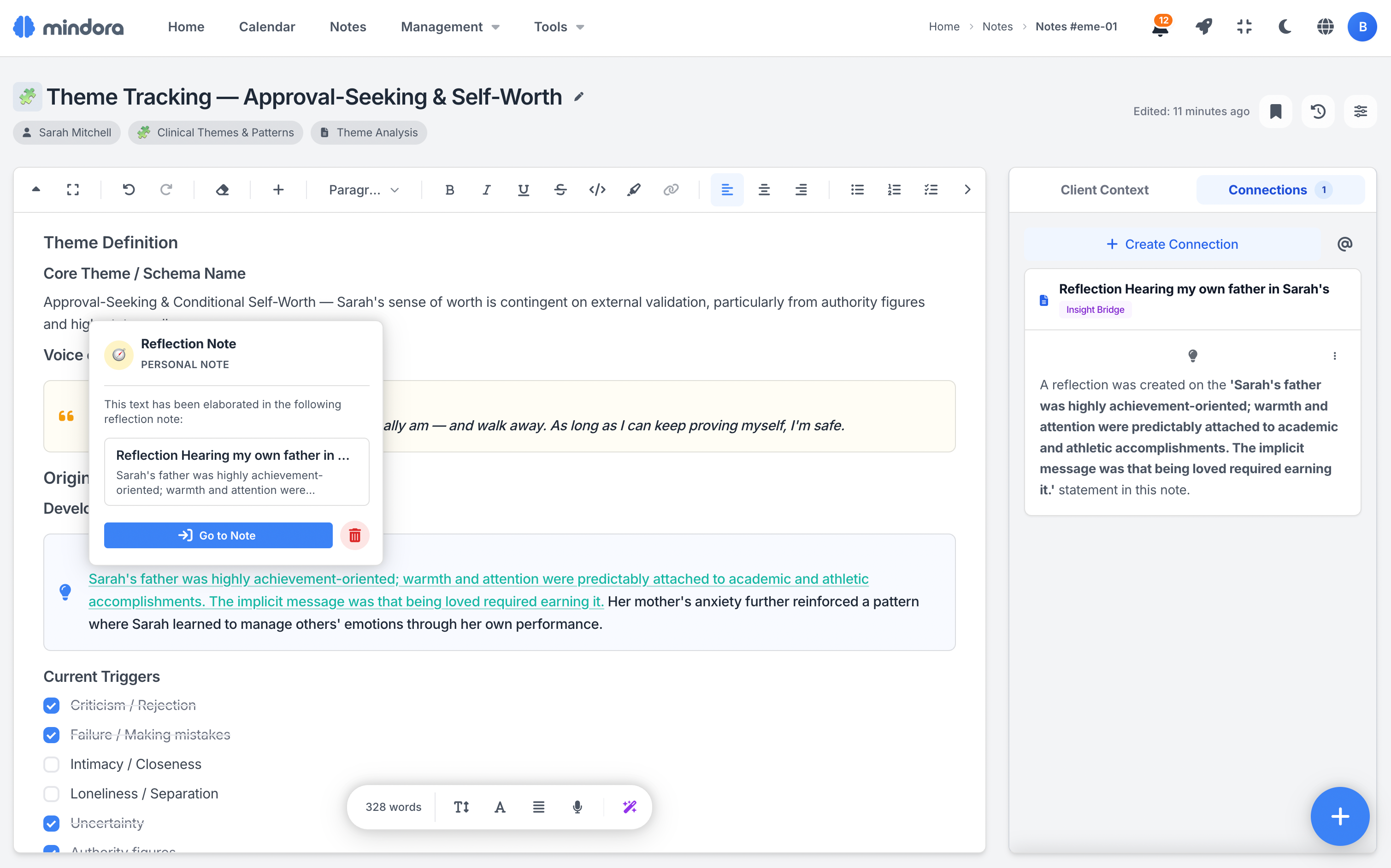
Highlighted at the Source
The reflected passage is highlighted in the source note; tapping it opens a preview with a jump to the reflection.
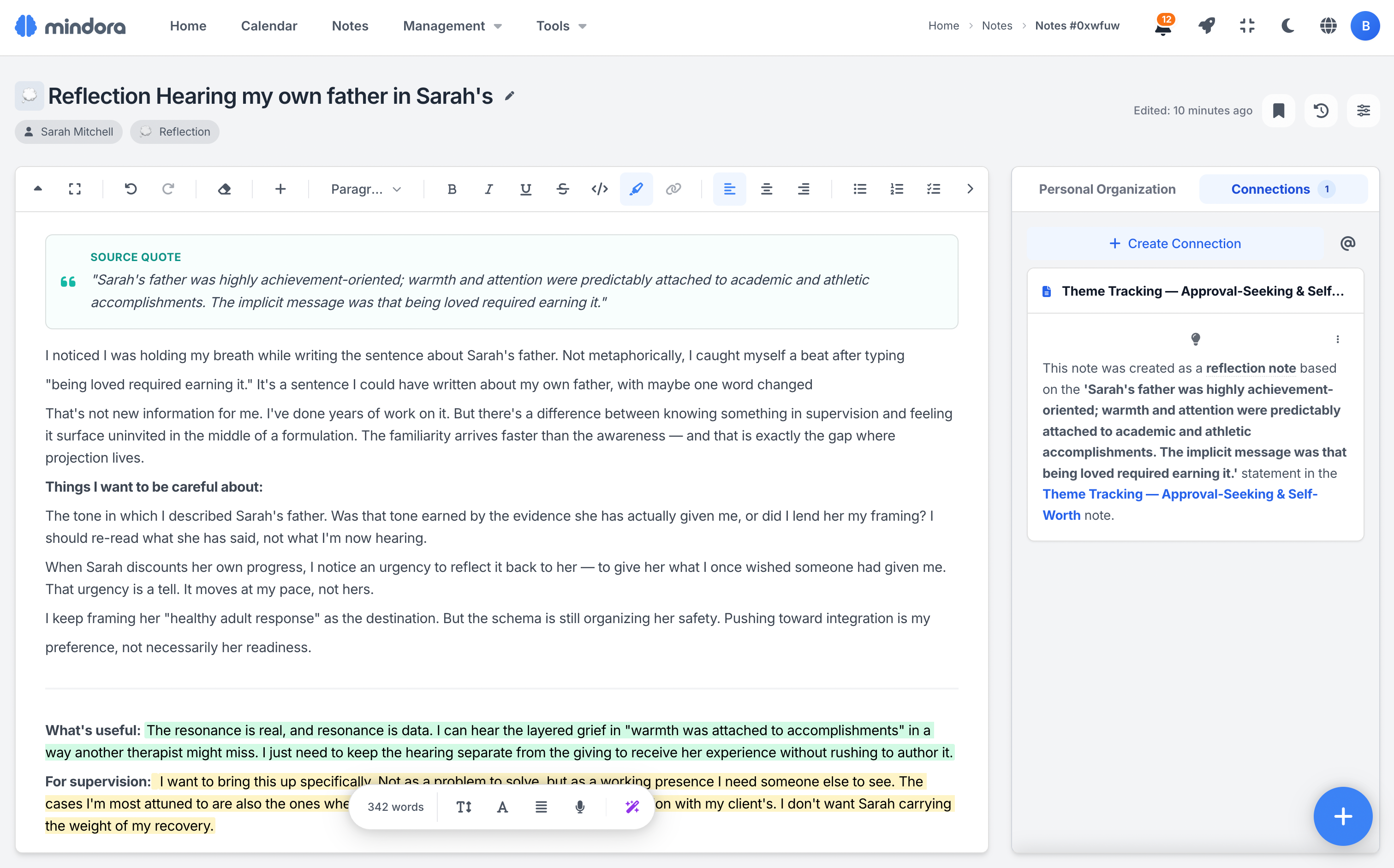
Structured Reflection
The resulting reflection note is automatically linked to the source quote. Structure it with templates for countertransference analysis, supervision prep, and more.
Clinical Workflow Roadmap
From assessment to termination, see where each clinical note type sits in the therapeutic process. Session notes, case formulations, treatment plans, reflections, and process reviews take on meaning in one unified flow.
This roadmap is not a strict rule, but a flexible guide. Adapt the stages to each client's process, repeat them as needed, or combine note types from different schools.
Assessment
Initial contact with the client, comprehensive clinical evaluation and problem analysis.
In her first session, Sarah mentioned sleep difficulties and a persistent sense of anxiety. But understanding the underlying pattern required a comprehensive assessment.
Formulation
Integration of gathered information, clinical themes, triggers, and case formulation.
When the assessment data came together, it became clear that Sarah had developed a systematic avoidance pattern in stressful situations.
Planning
Setting treatment goals and intervention strategies.
Together with Sarah, concrete and measurable goals were set to reduce avoidance behavior.
Intervention
Application and documentation of therapeutic techniques and interventions.
Sarah began questioning her negative thought patterns using cognitive restructuring.
When new information surfaces during intervention, additional assessment may be needed.
Monitoring
Evaluating treatment progress, breakthrough moments, and process tracking.
By session 8, Sarah's sleep quality had significantly improved — but social avoidance was still present.
When progress stalls, it may be time to revisit and refine the formulation.
If some goals are no longer relevant, the treatment plan gets updated.
Termination
optionalTreatment process evaluation, discharge summary, and relapse prevention.
After 16 sessions, Sarah was able to manage most of her initial symptoms.
Post-termination follow-up sessions can be planned to ensure gains are maintained.
The following processes are not tied to a specific phase — they are used throughout therapy.
Session Records
Systematic recording of each session content, observations, and plans.
Each session became an opportunity to record Sarah's experiences that week and the strategies she tried.
Documentation
Phone records, consultations, and formal reporting.
A consultation with Sarah's psychiatrist ensured coordination between medication and therapy.
Crisis Management
Crisis management can be activated at any point in the therapeutic process.
When Sarah experienced a sudden crisis in session 10, the pre-prepared safety plan was activated immediately.
Independent from the clinical flow, the therapist's own professional and personal development notes.
School Compatibility Table
Shows which note types are used in each therapeutic school. Core tools are essential components of that school.
| Note Type | CBT | ACT | DBT | Schema | EMDR | Psychodynamic | SFBT |
|---|---|---|---|---|---|---|---|
| Assessment | |||||||
| Initial Assessment | ✓ | ✓ | ✓ | ✓ | ✓ | ✓ | ✓ |
| Problem & Symptom Analysis | ✦ | — | ✓ | ✓ | — | ✓ | — |
| Symptom Cluster | ✓ | ✓ | ✓ | ✓ | ✓ | ✓ | ✓ |
| Psychometric Assessment | ✓ | ✓ | ✓ | ✓ | ✓ | ✓ | ✓ |
| Schema Assessment | — | — | — | ✦ | — | ✓ | — |
| Trauma Mapping | ✓ | ✓ | — | ✓ | ✦ | ✓ | — |
| Formulation | |||||||
| Clinical Theme & Pattern | ✓ | ✓ | — | ✓ | ✓ | ✦ | — |
| Resources & Strengths | ✓ | ✓ | ✓ | ✓ | ✓ | ✓ | ✦ |
| Coping Mechanism | ✓ | ✓ | ✓ | ✓ | ✓ | ✓ | ✓ |
| Triggers & Cues | ✓ | ✓ | ✓ | ✓ | ✓ | ✓ | — |
| Values | ✓ | ✦ | ✓ | — | — | — | ✓ |
| Key Life Events | ✓ | ✓ | — | ✓ | ✦ | ✓ | — |
| Clinical Hypotheses | ✓ | ✓ | — | ✓ | — | ✓ | — |
| Chain Analysis | ✓ | — | ✦ | — | — | — | — |
| Mode Analysis | — | — | — | ✦ | — | — | — |
| Case Formulation | ✦ | ✓ | ✓ | ✦ | ✓ | ✦ | — |
| Planning | |||||||
| SMART Goal | ✓ | ✓ | ✓ | ✓ | ✓ | — | ✓ |
| Treatment Plan | ✓ | ✓ | ✓ | ✓ | ✓ | ✓ | ✓ |
| Intervention | |||||||
| Intervention / Technique | ✓ | ✓ | ✓ | ✓ | ✓ | ✓ | ✓ |
| EMDR Protocol | — | — | — | — | ✦ | — | — |
| Monitoring | |||||||
| Process Evaluation | ✓ | ✓ | ✓ | ✓ | ✓ | ✓ | ✓ |
| Breakthrough Moment | ✓ | ✓ | ✓ | ✓ | ✓ | ✓ | ✓ |
| Diary Card | — | — | ✦ | — | — | — | — |
| Termination | |||||||
| Termination Summary | ✓ | ✓ | ✓ | ✓ | ✓ | ✓ | ✓ |
| Ongoing Processes | |||||||
| Session Note | ✓ | ✓ | ✓ | ✓ | ✓ | ✓ | ✓ |
| Phone Communication | ✓ | ✓ | ✦ | ✓ | ✓ | ✓ | ✓ |
| Consultation & Reporting | ✓ | ✓ | ✓ | ✓ | ✓ | ✓ | ✓ |
| Crisis & Safety Plan | ✓ | ✓ | ✦ | ✓ | ✓ | ✓ | ✓ |
And Much More
Import, PDF export, custom note types, custom templates, folder management, bulk actions, and many more features waiting for you.
What's the Difference?
Key differences between general-purpose tools and clinical note software.
General Tools
- Plain text editor, no clinical structure
- Notes are isolated, no way to build relationships
- No therapy-specific templates, start from scratch every time
- Separate tools needed for scales and scoring
- No data separation between clients
With Mindora
- Client quotes, clinical observations, and highlights are visually distinct
- Notes connect to treatment goals, building a clinical map
- Over 100 templates matching your approach, plus design your own
- Functioning, adherence, and intensity scales built right into the note
- Each client's data completely isolated from others
Beyond Writing: A Clinical Note System
In Mindora, notes don't stay as plain text. With templates, connections, reflections, and version history, they evolve over time into an organized knowledge network that carries the client's clinical process.
108 Ready Templates
Start with ready-made templates for different needs like SOAP, DAP, BIRP, EMDR, CBT, and crisis safety plans. Adapt them to your way of working to keep your notes standard and consistent.
Clinical Editor
Cleanly separate client expressions, your clinical observations, highlights, and connections within the same note. Your notes become readable, structured records that carry your clinical thinking.
37 Note Types
Use different note types for your clinical and personal workspaces. Start with 37 built-in system types, add your own when you need to, and shape the archive around your own practice.
Knowledge Connections
Connect notes, goals, and breakthrough moments through meaningful relationships. Use connections like evidence, obstacle, support, contradiction, or intervention to keep the clinical context visible.
Reflection Notes
Select a relevant sentence in a note and capture your own reflection without losing context. Keep the source of your thinking visible for countertransference, professional insight, or supervision prep.
Version History
Safely return to earlier versions of any note. The full change history is preserved, and affected connections and fields are clearly shown during restore, so nothing is ever silently lost.
Scale Blocks
Add SUD, VOC, Likert, frequency, and bipolar scales directly into your notes. Keep measurements inside the clinical context rather than a separate tool, and follow change from session to session.
Custom Template Editor
Build your own templates with blocks like text, scale, therapist note, and client expression. Shape your note structure to match your therapy approach and the exact way you prefer to work.
@ Inline References
Reference goals or other notes with @ as you write. The links stay visible right inside the note itself, so you can jump straight to the related record in a single click, without ever losing your place.
Note Reminders
Set a date and time on important notes to create reminders for yourself. Resurface follow-ups, paperwork, or supervision prep at exactly the right moment, so nothing ever slips through the cracks.
Folder Organization
Organize your personal notes inside folders. Arrange reflection, supervision, professional development, or research in your own structure, and reshape it freely as your archive grows.
Lifecycle Management
Across active, archived, and deleted notes, all connections and versions are preserved; no clinical context is ever lost. A restored note always comes back with its links and history fully intact.
Scenarios from Your Daily Practice
See how Mindora fits into a therapist's busy workflow.
At the End of a Busy Day
After six sessions, every client's note is ready with its template and context. Expressions, observations, and scales stay organized in one note; as the day closes, what remains is a completed clinical flow, not scattered records.
Supervision Preparation
Before supervision, review the client's chronological flow, reflection notes, breakthrough moments, and goal progress together. Walk in not with isolated notes, but with a unified clinical summary of the recent weeks.
Trying a New Approach
Bring a newly learned approach into your practice more deliberately. Start with ready-made templates for EMDR, CBT, Schema Therapy, or DBT; use scales, goal links, and clinical notes in the same flow.
Learn More
Detailed guides about the note system.
Frequently Asked Questions About Clinical Notes
Common questions about note types, templates, export, connections, and AI roadmap.
Ready to Transform Your Notes?
Create a free account and explore your clinical note system today.