Manage Your Clients from One Place
Manage Your Clients from One Place
Manage Your Clients from One Place
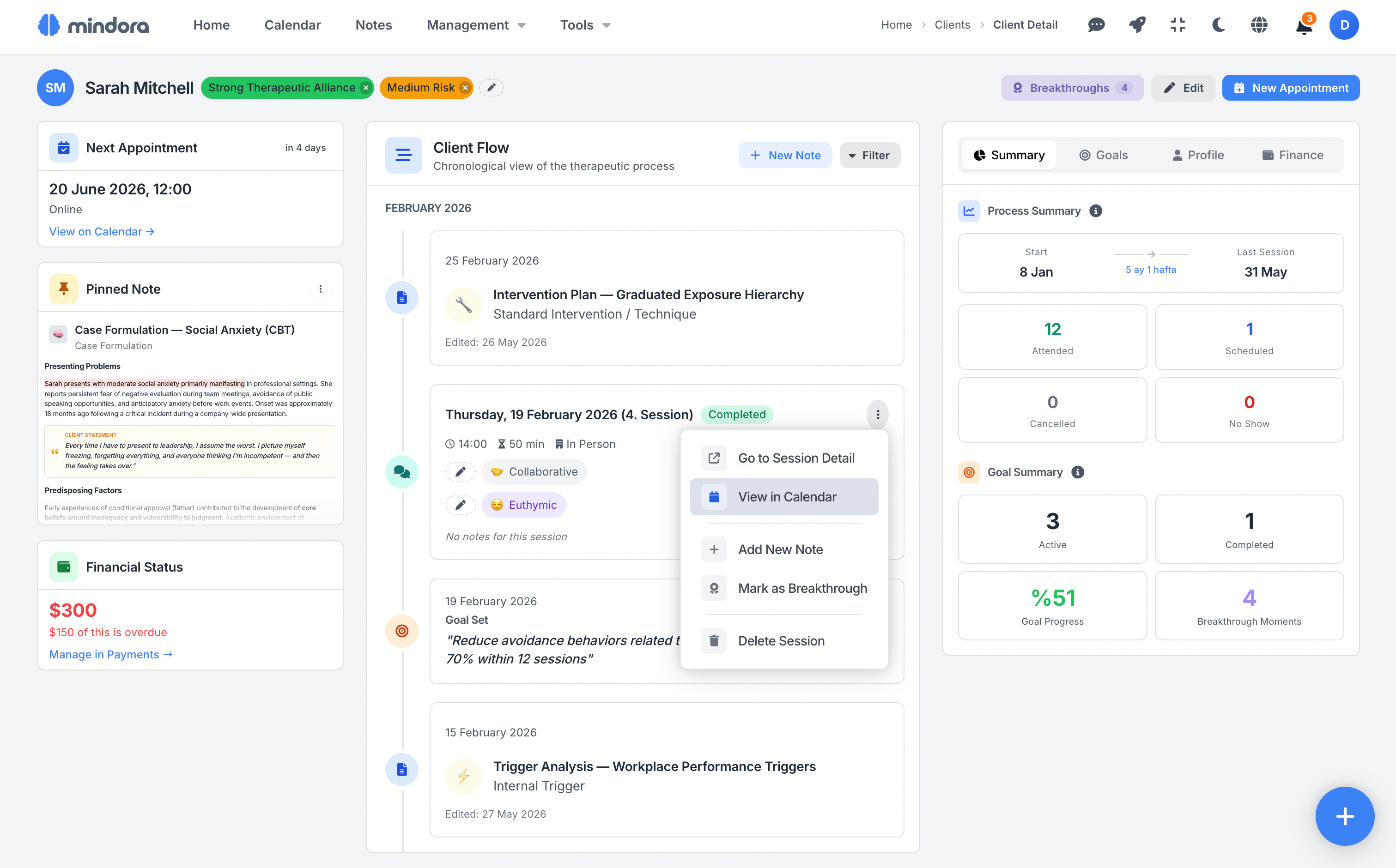
See each client's profile, session history, goals, and process flow in a single layout. Mindora lets you track the complete clinical picture without splitting your client's information across scattered screens.
Click the icon at the top right to switch to dark mode.
Auto-Add Clients from Your Website
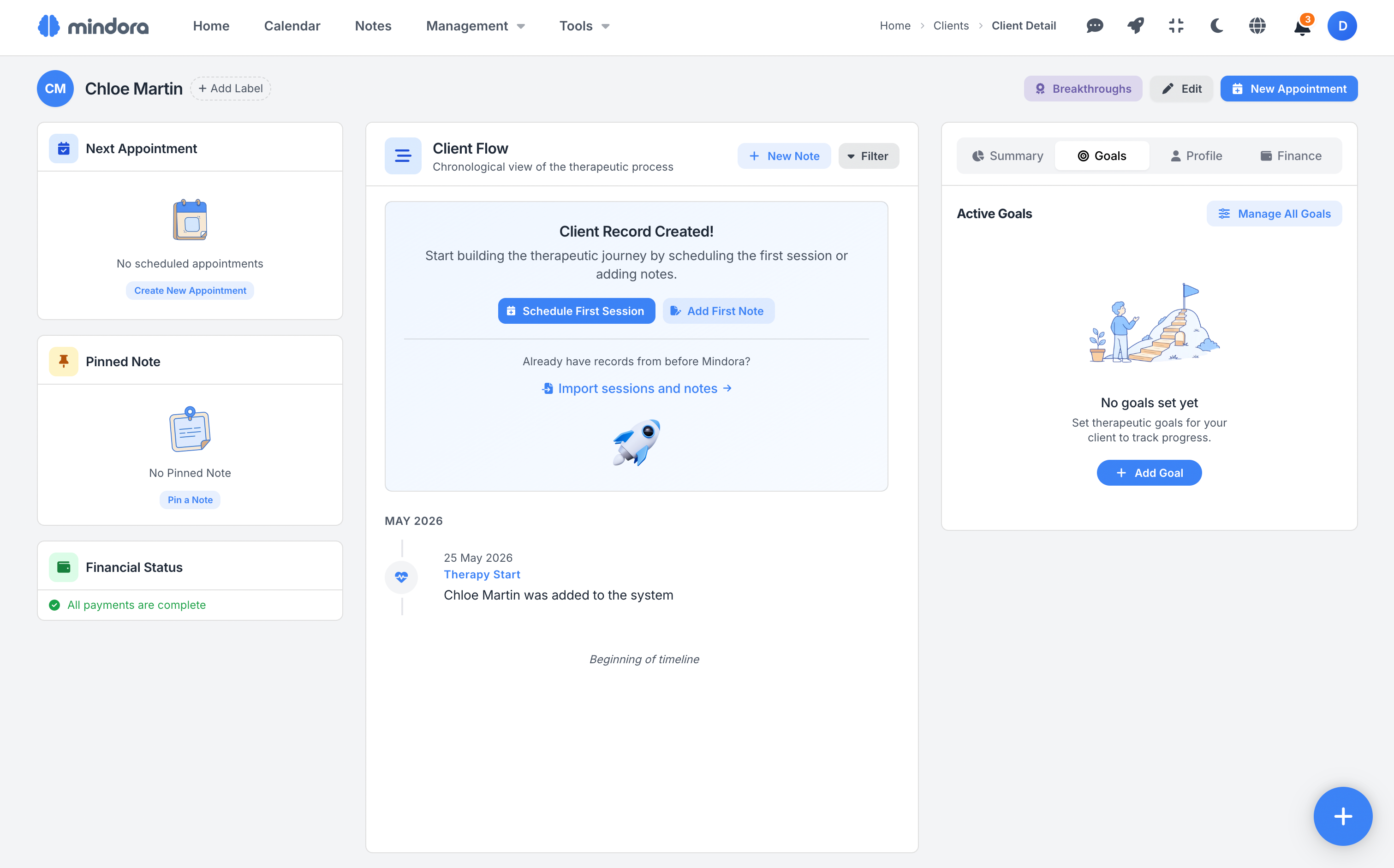
New clients who book an appointment through your website are added to Mindora automatically. The information shared in the form creates a client profile; you track the process from your panel without dealing with manual data entry.
Profile and Process: Two Views, One Whole
Mindora explains every client through two views: a rich profile that answers "Who is this client?" and a chronological flow that answers "Where is the process now?".
Process Summary
Start
Dec 2, 2025
2 months 17 days
Last Session
Feb 18, 2026
Goal Summary
2
Active
1
Completed
%65
Goal Progress
3
Breakthrough Moments
Everything in One Panel
See your client's process summary, goals, profile details, and payment status in a single panel. Mindora presents key information like session history and goal progress in a quickly scannable layout.
Switch between tabs to reach the detail you need. Before every session, reconnect with your client's process easily.
A Chronological Map of the Process
Sessions, clinical notes, goals, and breakthrough moments merge into a single chronological flow. Track your client's journey as a unified process, instead of scattering across screens.
Go back and scan past sessions, spot patterns, and strengthen your case formulation over time. Before supervision, treatment plan revisions, or process reviews, your client's clinical story is in front of you at a glance.
(soon: assessment scales and homework)
December 2, 2025
Therapy Started
Sarah Mitchell was added to the system
December 2, 2025
Initial Assessment — Social Anxiety
Comprehensive Biopsychosocial Anamnesis
December 3, 2025 (1. Session)
CompletedDecember 4, 2025
Case Formulation — CBT Conceptualization
Case Formulation (CBT)
December 4, 2025
Treatment Plan — CBT for Social Anxiety
Standard Clinical Treatment Plan
December 4, 2025
Goal Set
"Reduce avoidance behaviors by 70% within 3 months"
December 4, 2025
Goal Set
"Build assertive communication skills"
December 10, 2025 (2. Session)
CompletedDecember 11, 2025
Intervention — Cognitive Restructuring Exercise
Standard Intervention / Technique
December 17, 2025 (3. Session)
CompletedDecember 24, 2025 (4. Session)
CompletedDecember 26, 2025
Clinical Hypothesis — Avoidance Maintenance Cycle
Clinical Hypothesis
January 7, 2026 (5. Session)
CompletedJanuary 14, 2026 (6. Session)
CompletedJanuary 16, 2026
Supervision Notes — Therapeutic Alliance Review
Supervision Session Notes
"Sarah stayed in a one-on-one meeting with a senior colleague without escaping. She named the discomfort, used the breathing protocol, and completed the meeting."
First measurable evidence that the exposure-based approach is reducing avoidance. Worth consolidating in next session before pushing the hierarchy further.
January 21, 2026 (7. Session)
CompletedJanuary 28, 2026 (8. Session)
Completed"Sarah is independently applying cognitive-behavioral skills outside of session, particularly in evaluative work scenarios where avoidance was most entrenched."
Convergent improvement across both measurement domains. The next phase should consolidate gains while building meta-cognitive awareness as a long-term protective factor.
January 28, 2026
Goal Completed
"Develop cognitive restructuring skills"
January 28, 2026
Reflection — On the Breakthrough Moment
Reflection
January 29, 2026
Mid-Treatment Progress Review
Periodic Progress Evaluation
January 30, 2026
Countertransference Awareness
Counter-Transference Analysis
February 11, 2026 (9. Session)
No ShowFebruary 18, 2026
Goal Completed
"Build assertive communication skills"
February 25, 2026 (10. Session)
UpcomingDecember 15, 2025
Therapy Started
James Chen was added to the system
December 18, 2025
Initial Assessment — Complicated Grief
Focused Assessment (Brief Intake)
December 18, 2025 (1. Session)
CompletedDecember 19, 2025
Session Note — Grief Timeline Exploration
Standard Session Note
December 20, 2025
Case Formulation — Grief Processing Model
Case Formulation Summary
December 20, 2025
Treatment Plan — Grief-Focused Therapy
Collaborative Roadmap
December 20, 2025
Goal Set
"Process grief without guilt or self-blame"
January 8, 2026 (2. Session)
CompletedJanuary 9, 2026
Intervention — Grief Journaling Exercise
Standard Intervention / Technique
January 15, 2026 (3. Session)
CompletedJanuary 17, 2026
Clinical Hypothesis — Guilt-Happiness Conflict
Hypothesis Testing and Evidence Balance
January 17, 2026
Goal Set
"Reconnect with social support network"
January 22, 2026 (4. Session)
CompletedJanuary 23, 2026
Personal Loss Resonance
Reflection Template
January 24, 2026
Grief Countertransference Discussion
Supervision Preparation
February 26, 2026 (5. Session)
UpcomingTrack Treatment Goals and Document Closure
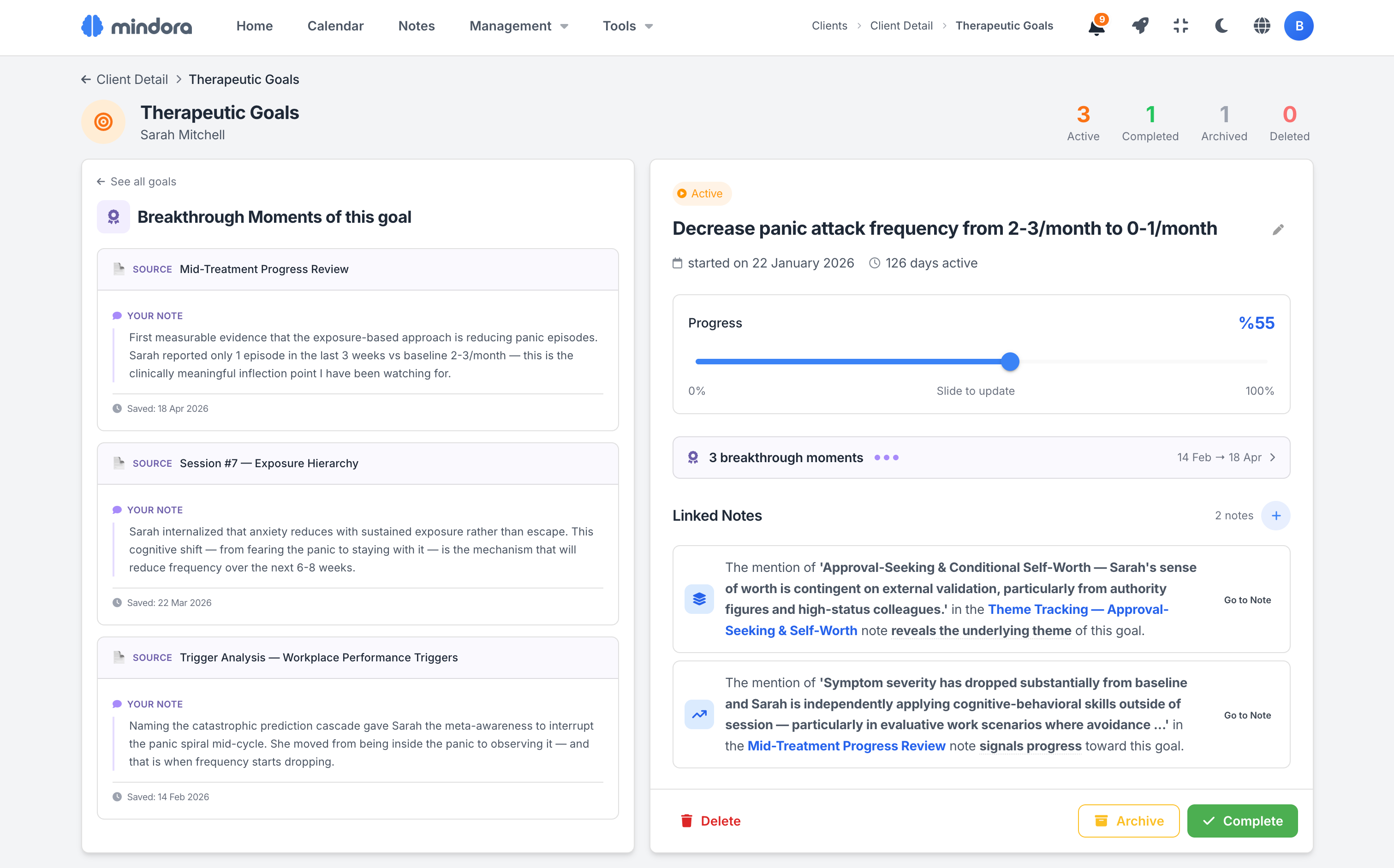
Set treatment goals for each client and track progress over time. Mindora keeps goals visible alongside session notes and the clinical process.
Record your clinical summary when a goal is completed, and the archive reason when one is archived. So the client's change process moves beyond scattered notes; it becomes a meaningful record with a beginning, progress, and an outcome.

The Clinical Story Behind Every Goal
Track treatment goals not just by percentage, but through the clinical moments that explain that progress. Connect meaningful observations from session notes to goals to make the reasons for change visible.
With connections like progress, setback, obstacle, exploration, intervention, and theme, preserve each goal's clinical context. So every goal becomes a living record of the client's change process.
Manage Your Client List with Ease
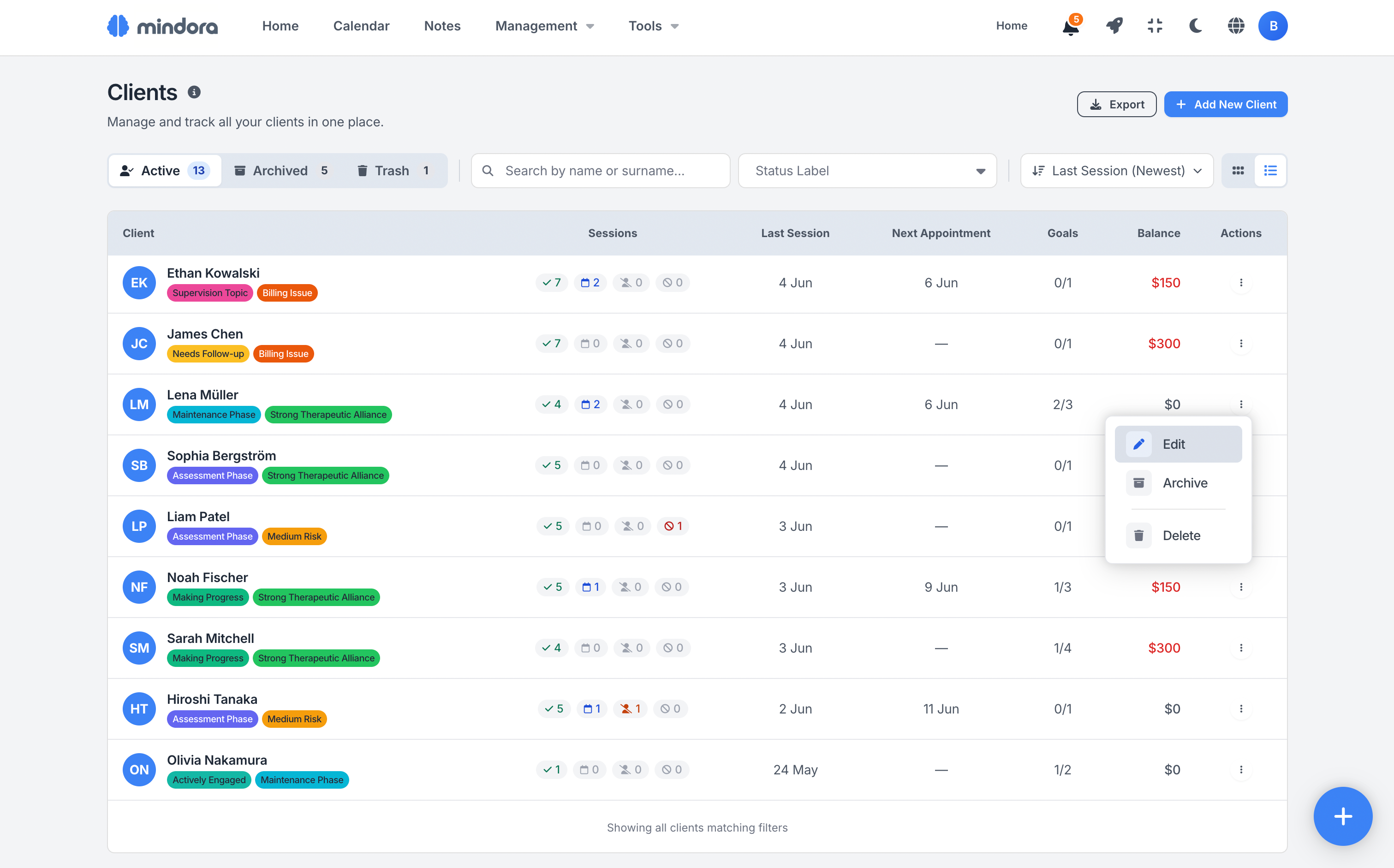
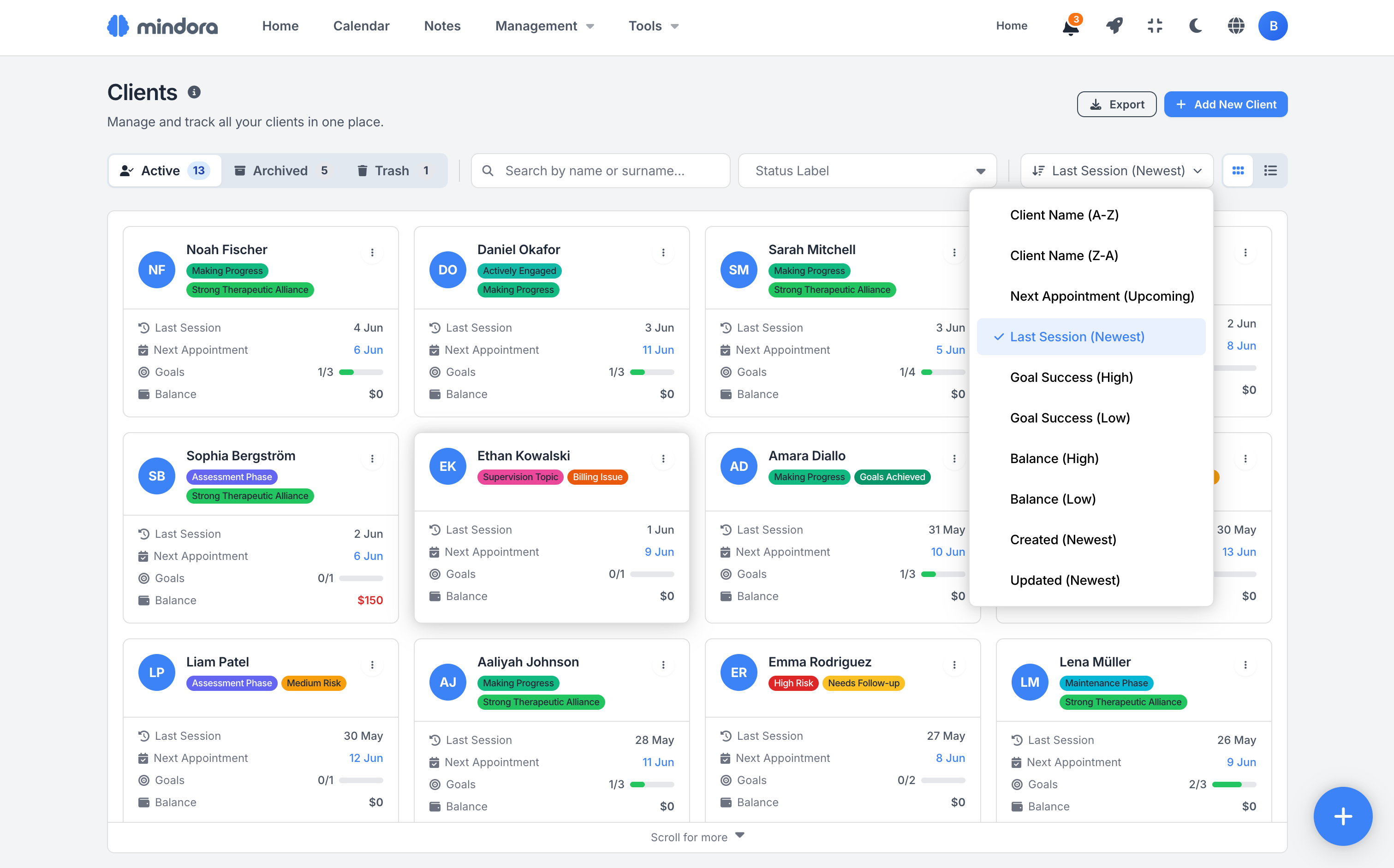
Track all your clients in a tidy card or table view. Reach the one you need quickly with search, filters, and status labels.
Last session, upcoming appointment, goal progress, and payment status appear on every card. So your client list turns into a quick command center for your daily workflow. In table view, each client's past, upcoming, no-show, and cancelled session counts appear in a single row.
See the Financial Picture at a Glance
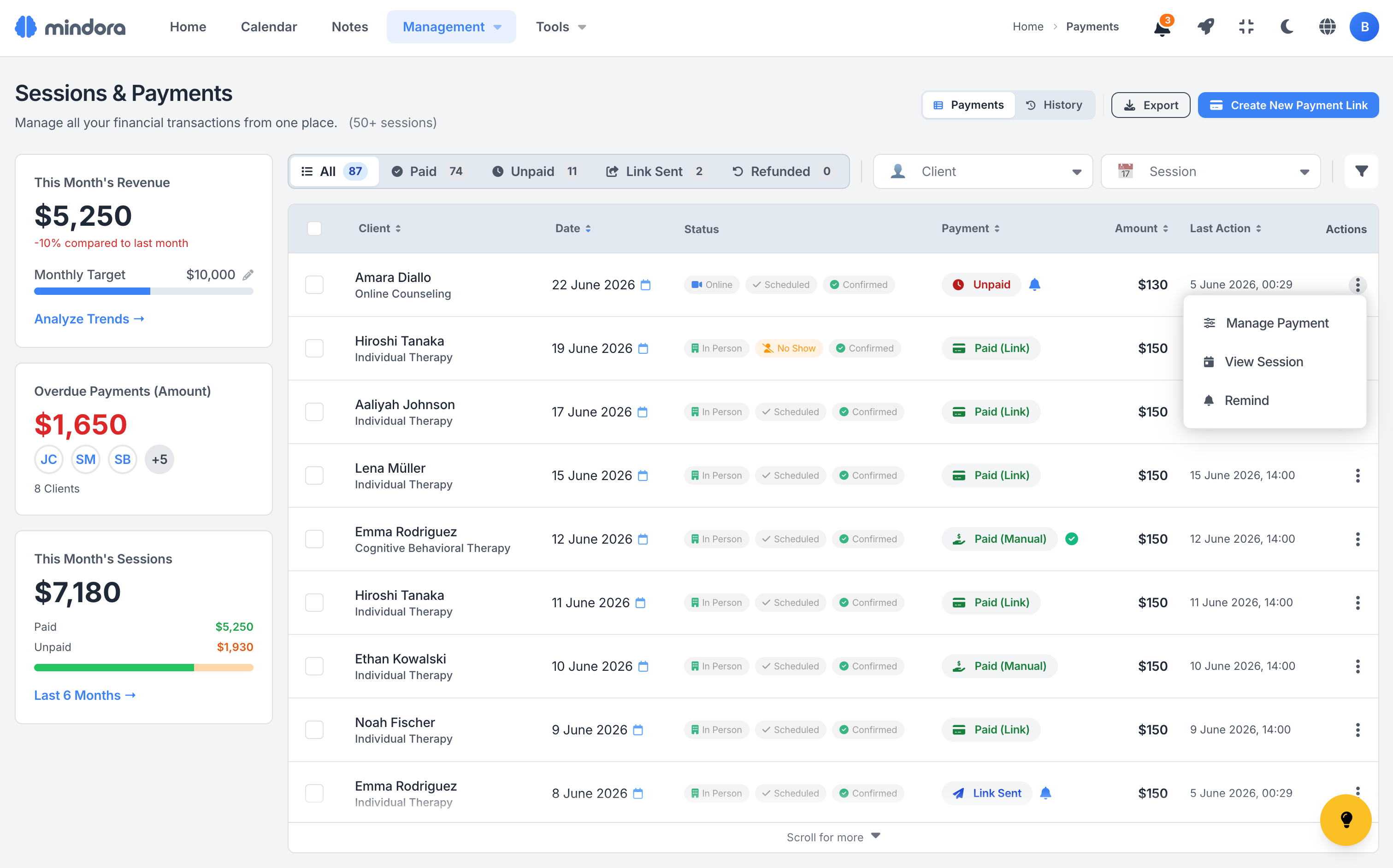
Track paid, pending, and overdue session fees in a single layout. See every session's payment status clearly, with the client, date, and amount in one row.
Set a fixed fee per client, per service, or a custom amount per session. Mindora carries that choice into the session-creation flow, so payment info always lands with the right context.
And Much More
Bulk actions, client export, communication preferences, online booking integration, and many more features waiting for you.
The Whole Case in One Profile
From profile to clinical flow, goals to payment status, every important detail comes together in one place. Mindora lets you see each client not just as a record, but as an ongoing clinical process.
Rich Client Profile
A client's contact info, demographics, language and timezone preferences, status labels, and default fee come together in one profile — the essentials always within reach.
Status Labels
Add meaningful labels to clients for risk, progress, clinical process, and administrative states. Use labels to read your client list faster, filter it, and prioritize your day at a glance.
Emergency Contact
Store the emergency contact's name, relationship, and phone number securely in the client profile. Reach the right contact info quickly when it matters most.
Pinned Note
Keep the most critical information about a client always visible at the top of the profile. Case formulation, crisis triggers, or custom reminders stay in view before every session.
Client Flow
Sessions, notes, goals, and breakthrough moments merge into a single chronological flow. Track the client's process over time and easily see patterns and meaningful changes.
Breakthrough Moments
Capture turning points in therapy from sessions, notes, or text snippets. Link these moments to goals so the client's story of change becomes visible across the whole journey.
Clinical and Financial Summary
Track a client's clinical process and payment status in one profile. Session stats, goal progress, balance, and the financial summary are visible at a glance, with no page switching.
Goal Tracking
Set treatment goals, track progress as a percentage, and document closure when a goal is completed. Every goal becomes a meaningful part of the client's change process.
Smart Search and Sort
Search and sort clients by name, appointment date, goal status, balance, or creation date. Even when your list grows to hundreds of clients, reach the right record in seconds.
Data Export
Export your client list to CSV or Excel. The filtered view carries over to the file, so you can share, archive, or report on exactly the records you need in an organized way.
Lifecycle Management
Manage clients across active, archived, and deleted states. The archive reason and full history are preserved, so you can safely restore any record when a client returns to therapy.
Encryption and Data Security
ID information, emergency contact data, and client records are protected with strong security. Store sensitive information safely with KVKK-compliant data management.
Use Cases
Real examples from therapists' daily workflows.
After the First Session with a New Client
Create your first session note, complete the client profile, and set initial goals. In the next session, the client's essentials, your first impressions, and planned goals are ready and waiting for you.
Preparing for Supervision
Review the client flow, look over breakthrough moments and goal progress. Walk into supervision not with scattered notes, but with a unified clinical summary of the client's process.
Closing the Process
Document completed goals, write the final session note, and archive the client. From start to closure, the whole process; notes, goals, and key turning points; stays preserved on record.
Related Guides
Step-by-step guides for client management details.
Frequently Asked Questions About Client Management
Common questions about limits, import, archiving, and data ownership.
Get to Know Your Clients Better
Free for your first 3 active clients, no credit card required.